One file in a small Kotlin project says hello, and seven different runners answer: a JVM, a Mac, a Swift app, Node.js, and a WebAssembly module. They all ran the same main() function. This article shows what stands between that one file and each answer: the targets in the build file, and the artifacts each target produces.
A Kotlin Multiplatform (KMP) target is a build configuration. It asks one platform to build its own library and its own executable from your shared source.
One word: target
You might be an Android developer, an Apple developer, a system programmer, or a web developer. Each of these worlds uses the word “platform” to mean something different. An Android developer thinks of the Android framework. An Apple developer thinks of the SDK. A system programmer thinks of .dylib or .a files on Linux or Windows. A web developer thinks of Node.js or WASM.
KMP uses one word for all of these: target.
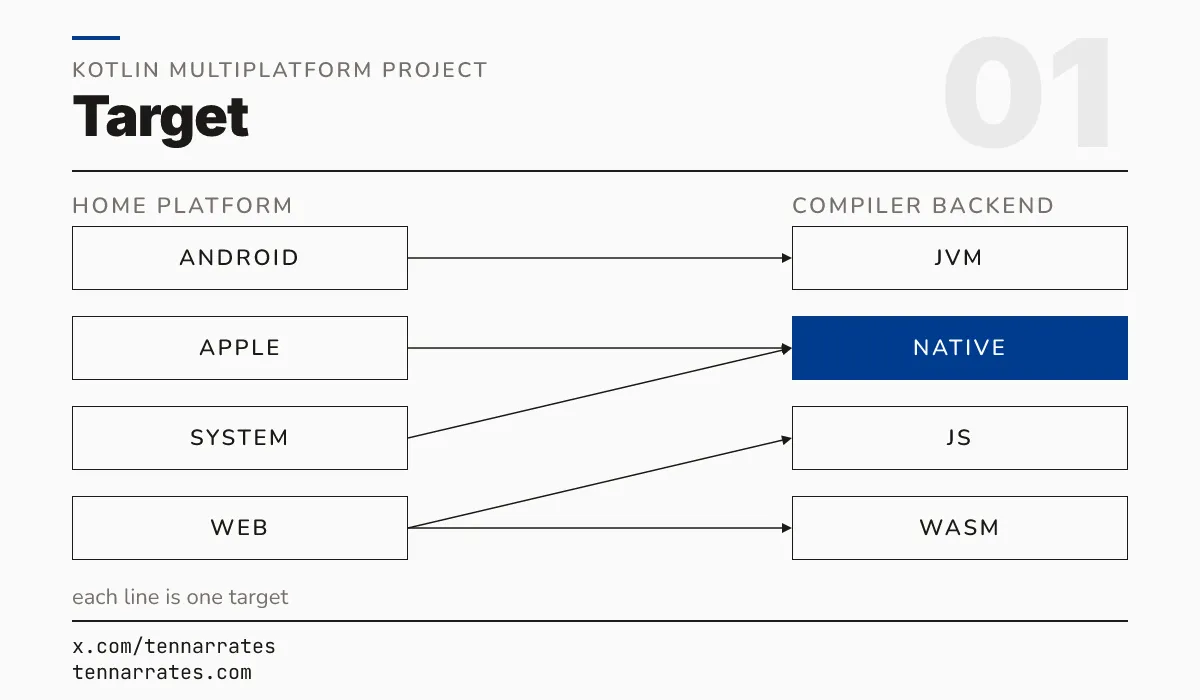
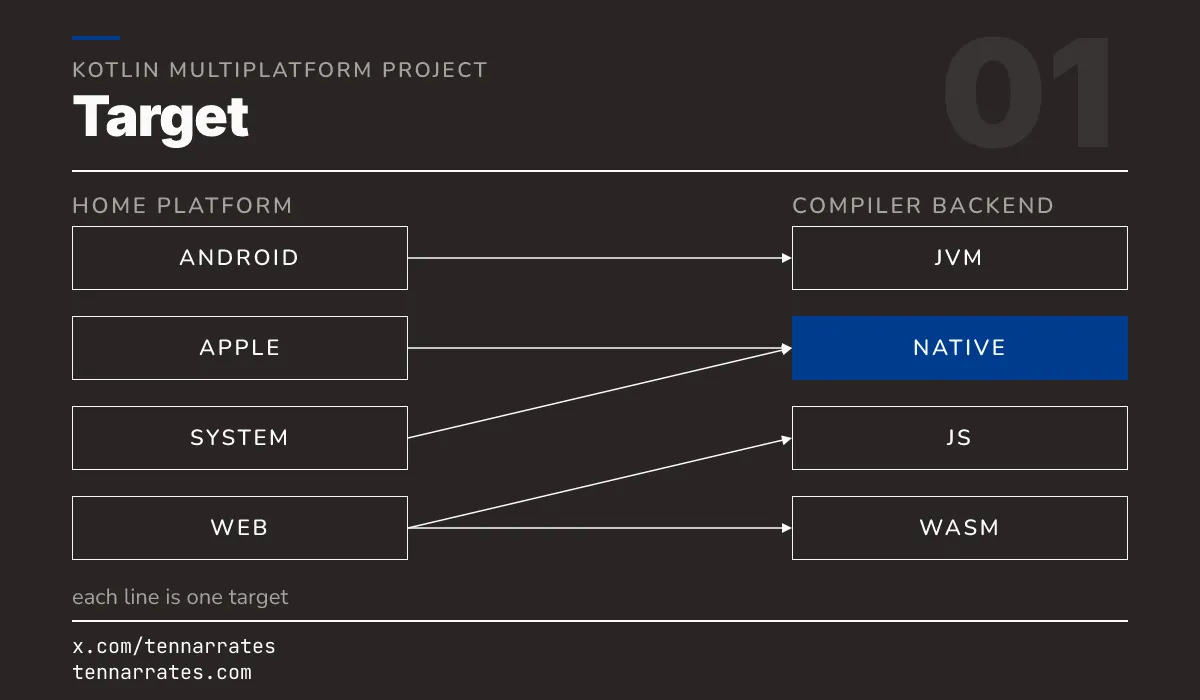
These groups overlap with your home platform, but they do not match exactly. An “Apple developer” uses multiple Native targets, such as macosArm64 and iosArm64. A “system programmer” also uses Native targets for Linux and Windows.
What every platform already knows
Before you look at a build file, there is a common ground. Every platform already knows how to ship two things: a library and an executable.
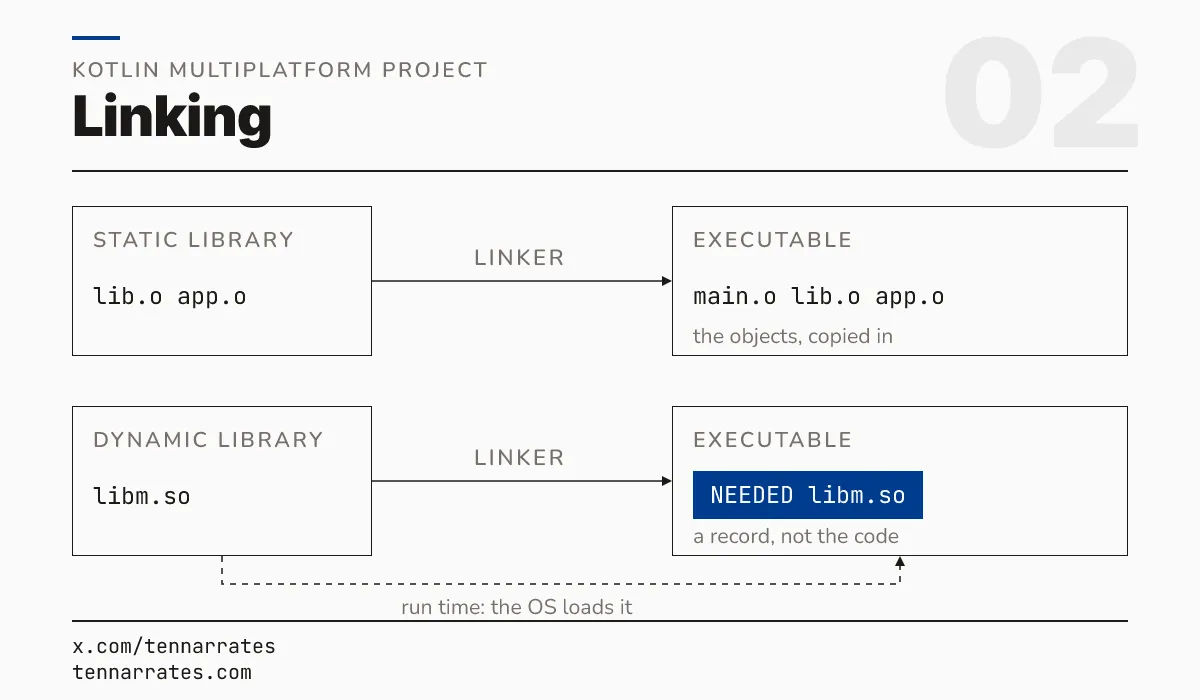
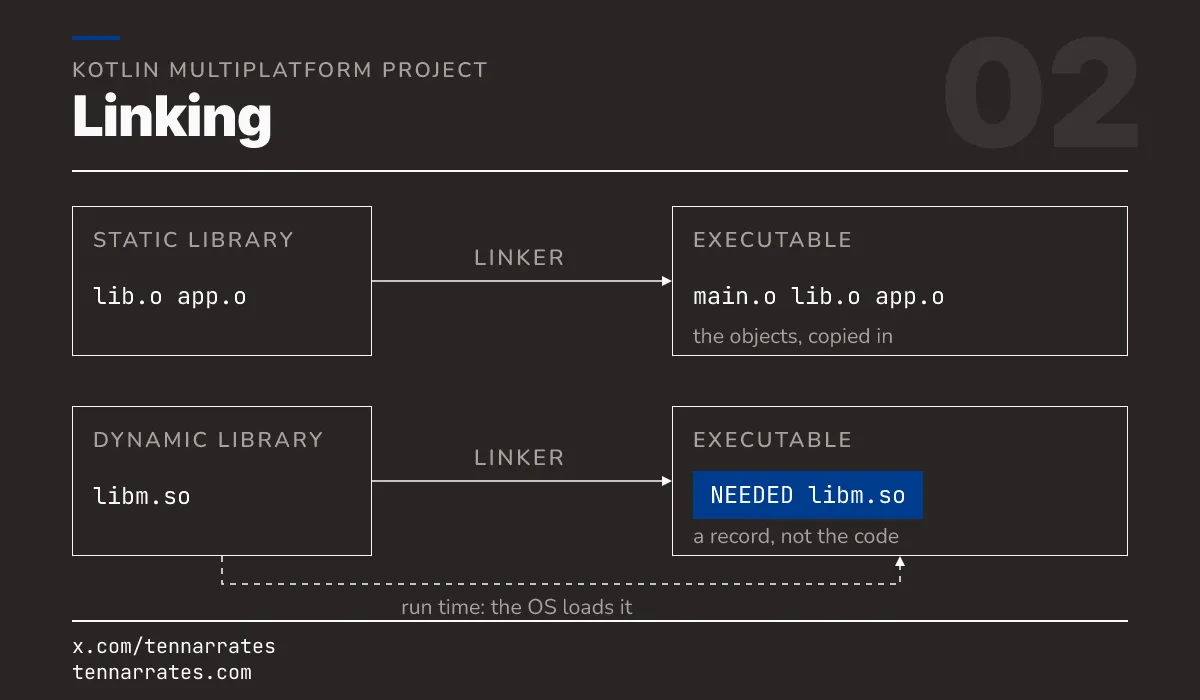
A system programmer sees this journey clearly. Source code goes through a compiler to become an object file (.o). Then a linker joins object files and libraries into a final product.
A static library is an archive of object files. The linker copies the objects it needs directly into the output.
  __.SYMDEF SORTED
lib.o out/app-from-static-a:
/usr/lib/libSystem.B.dylib (compatibility version 1.0.0, current version 1359.0.0)A dynamic library is a finished binary. The linker does not copy the code. Instead, it records a dependency that the operating system loads at run time.
ELF 64-bit LSB shared object, x86-64, version 1 (SYSV), dynamically linked NEEDED libdl.so.2
NEEDED libm.so.6
NEEDED libpthread.so.0
NEEDED libgcc_s.so.1
NEEDED libc.so.6
NEEDED ld-linux-x86-64.so.2The linker uses a runtime search path, or rpath, to find these libraries.
  out/app-rpath-ok:
  	out/libhello.dylib (compatibility version 0.0.0, current version 0.0.0)
  	/usr/lib/libSystem.B.dylib (compatibility version 1.0.0, current version 1359.0.0)
The build tool handles the hard part. When you name a target, the tool knows which system libraries to provide. It adds the dependencies to the binary automatically.
A KMP project starts with a few build files. The settings.gradle.kts file names the project. The build.gradle.kts file contains the kotlin {} block. This block is where you configure your targets.
A target defines the format of the produced binaries and the allowed dependencies.
  kotlin {
      jvm()
      androidTarget()
      macosArm64()
      linuxX64()
      linuxArm64()
      mingwX64()
      js(IR) {
          nodejs()
          binaries.executable()
          browser { testTask { enabled = false } }
      }
      wasmJs {
          nodejs()
          binaries.executable()
      }
      macosArm64 {
          binaries {
              executable()
              framework { baseName = "HelloPlatform" }
              staticLib()
          }
      }
      linuxX64 {
          binaries { executable(); sharedLib() }
      }
      linuxArm64 {
          binaries { executable(); sharedLib() }
      }
      mingwX64 {
          binaries { executable(); sharedLib() }
      }
  }
In this project, we configure targets for the JVM, Android, macOS, Linux, Windows, JavaScript, and WebAssembly. For each target, we specify if we want an executable, a framework, or a library.
The source names the platform
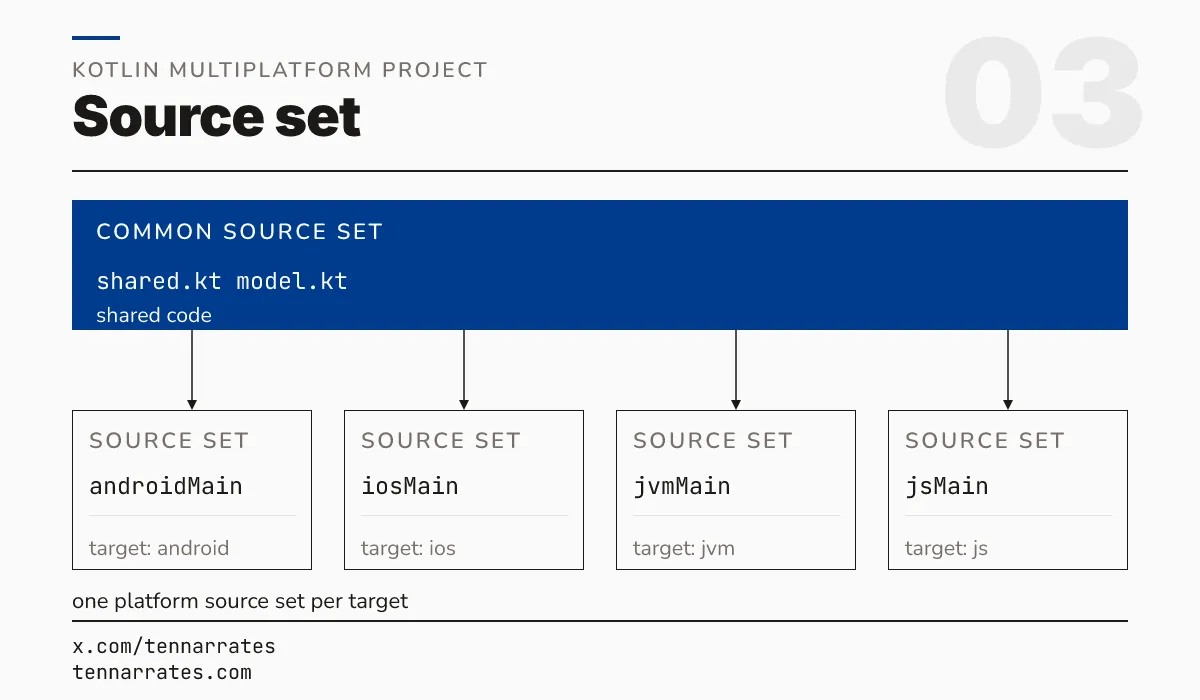
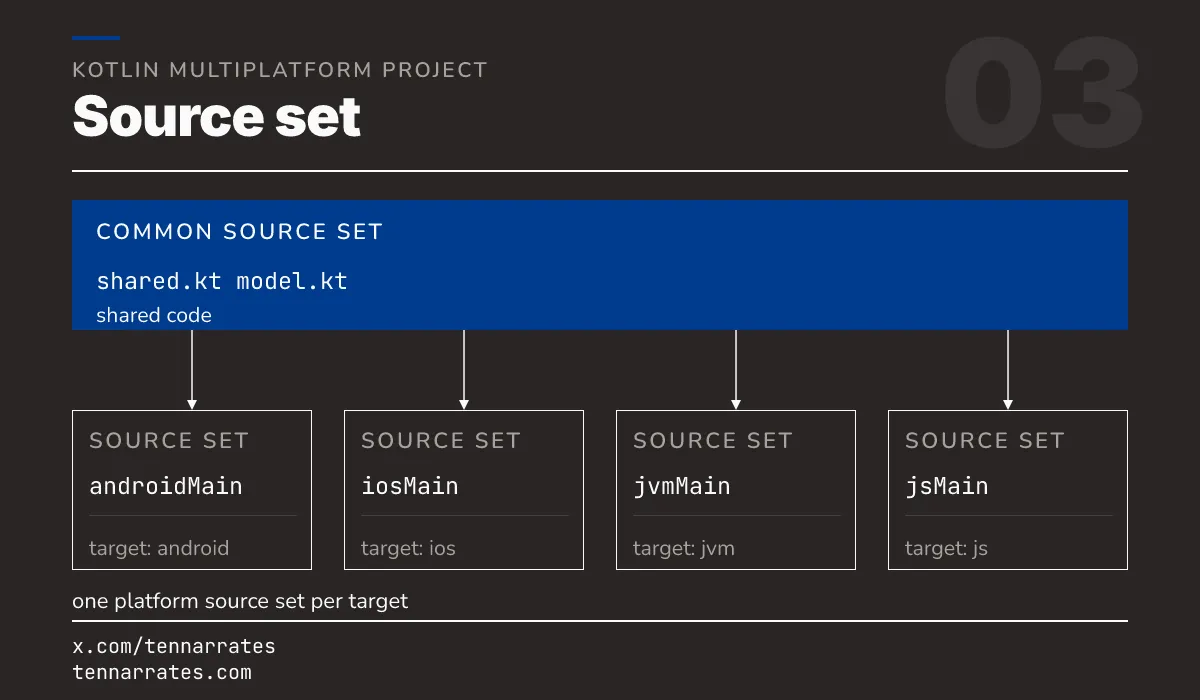
KMP uses source sets to organize code. A source set is a group of files with its own targets and dependencies.
To use a platform-specific API in shared code, you use the expect and actual keywords.
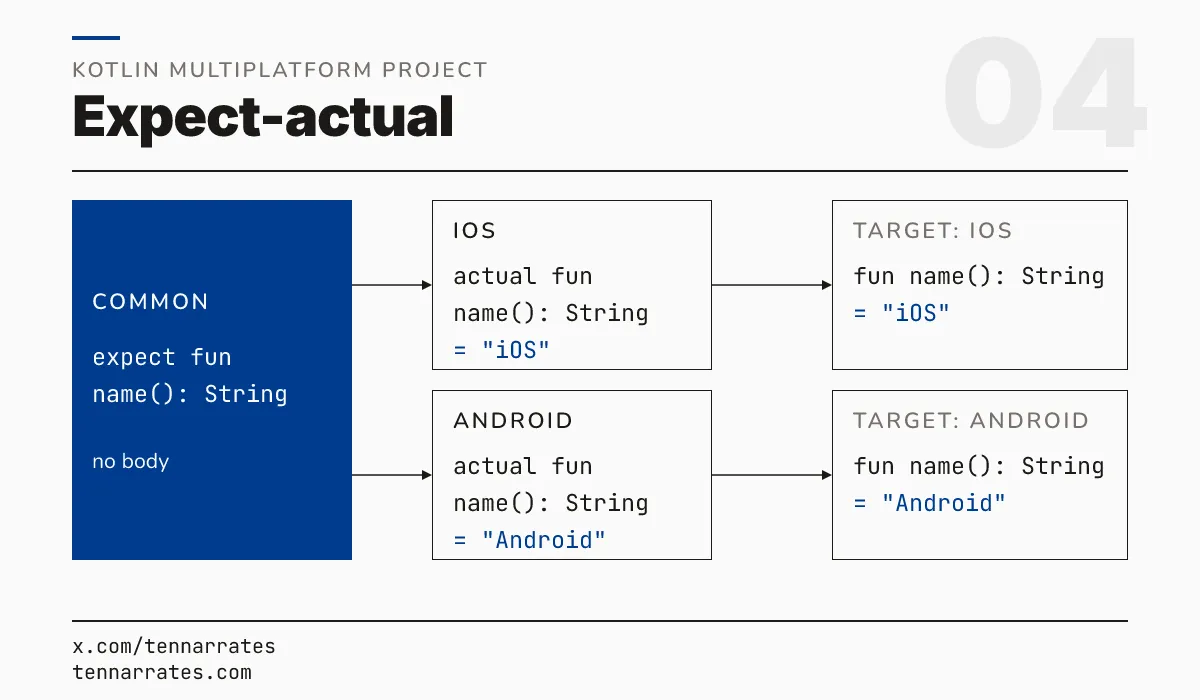
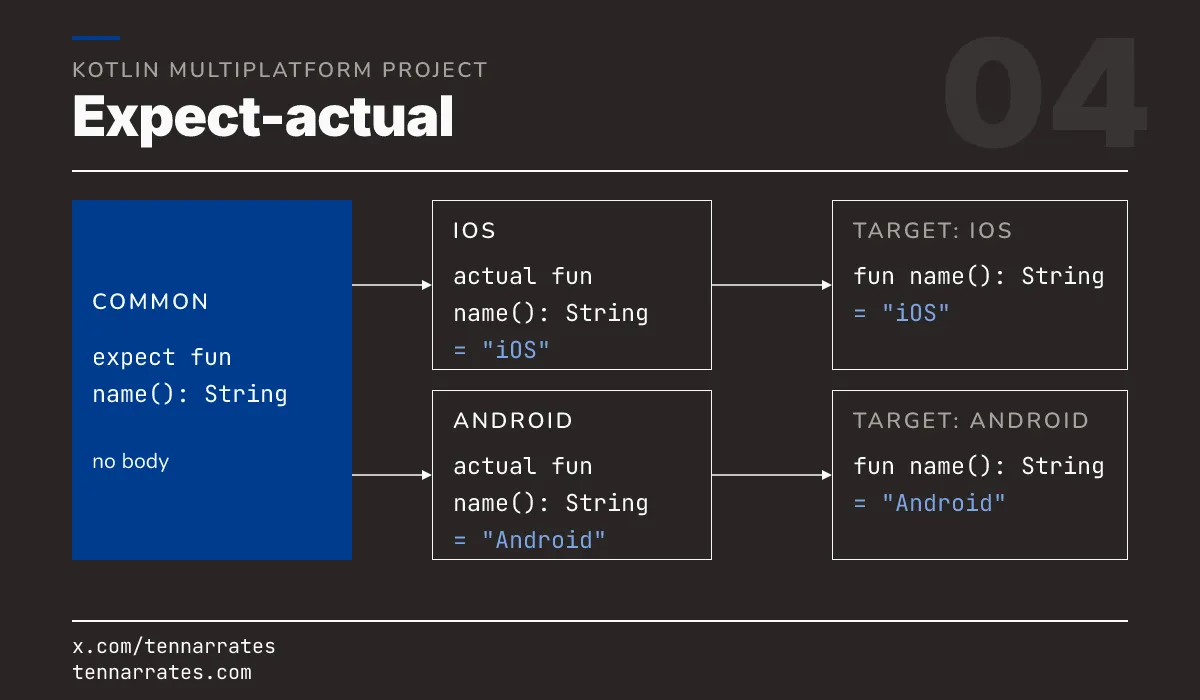
In each platform source set, you write the actual implementation.
  src/jvmMain/kotlin/Platform.jvm.kt:      actual fun platformName(): String = "JVM"
  src/androidMain/kotlin/Platform.android.kt: actual fun platformName(): String = "Android"
  src/macosMain/kotlin/Platform.macos.kt:   actual fun platformName(): String = "macOS"
  src/linuxMain/kotlin/Platform.linux.kt:   actual fun platformName(): String = "Linux"
  src/mingwMain/kotlin/Platform.mingw.kt:   actual fun platformName(): String = "Windows"
  src/jsMain/kotlin/Platform.js.kt:         actual fun platformName(): String = "JavaScript"
  src/wasmJsMain/kotlin/Platform.wasm.kt:   actual fun platformName(): String = "WASM"
The compiler merges the expect and actual declarations for each target at compile time.
Hello, Platform! runs on every target
When you run the project, the same main() function produces different results on different machines.
On the JVM, the runner is JavaExec.
Hello, JVM!On macOS, the build produces a native executable called a .kexe.
Hello, macOS!On Apple platforms, a Swift app can consume the Kotlin code through a framework.
Hello, macOS!On the web, the code runs as JavaScript in Node.js.
Hello, JavaScript!It also runs as a WebAssembly module.
Hello, WASM!One source file, but seven different runners.
Apple: the framework
The macosArm64 target produces three different artifacts: a .kexe, a .framework, and a .a static library.
A framework is more than just a library. It is a bundle.
  HelloPlatform.framework/Versions/A/Headers/HelloPlatform.h
  HelloPlatform.framework/Versions/A/HelloPlatform
  HelloPlatform.framework/Versions/A/Modules/module.modulemap
  HelloPlatform.framework/Versions/A/Resources/Info.plist
The bundle contains a dynamic library, an Objective-C header, a module map, and metadata.
Mach-O 64-bit dynamically linked shared library arm64A raw static library is just an archive of objects.
current ar archiveSwift cannot import a raw header file. It needs a module map to understand the module.
  framework module "HelloPlatform" {
      umbrella header "HelloPlatform.h"
      export *
      module * { export * }
      use Foundation
  }
The framework provides an Objective-C header. This header wraps Kotlin functions with annotations that Swift understands.
  + (NSString *)hello __attribute__((swift_name("hello()")));
  + (NSString *)platformName __attribute__((swift_name("platformName()")));
The Swift app links to the framework using @rpath.
  Hello, macOS!
  ...
  @rpath/HelloPlatform.framework/Versions/A/HelloPlatform (compatibility version 0.0.0, current version 0.0.0)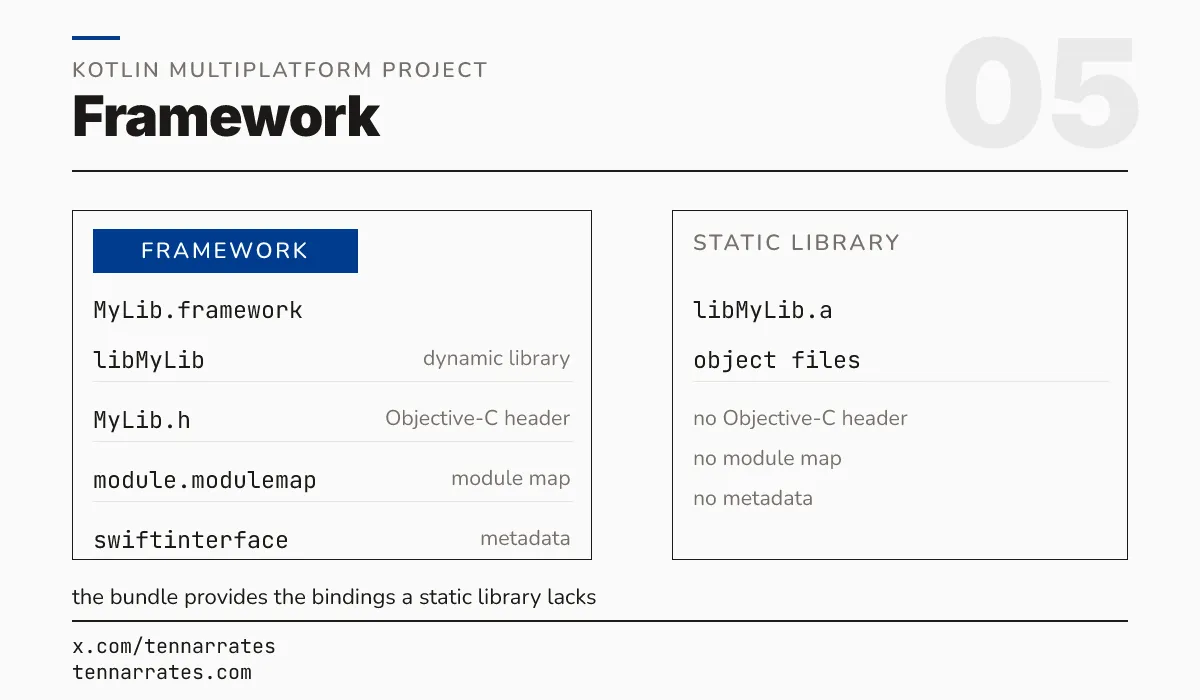
Android and the JVM: the jar
The JVM target does not produce native machine code. It produces a .jar file containing JVM bytecode.
  META-INF/
  META-INF/MANIFEST.MF
  GreetKt.class
  Platform_jvmKt.class
  META-INF/hello-platform.kotlin_module
The jar is a library. If the code has a main() function, the JVM can run it as an executable.
  tasks.register<JavaExec>("run") {
      group = "execution"
      description = "Runs the JVM main"
      mainClass.set("GreetKt")
      ...
  }
The Android target wraps these classes in an Android Archive, or .aar.
  Archive: hello-platform-debug.aar
    Length      Date    Time    Name
  ---------  ---------- -----   ----
          0  02-01-1980 00:00   R.txt
        211  02-01-1980 00:00   AndroidManifest.xml
       1637  02-01-1980 00:00   classes.jar
        156  02-01-1980 00:00   META-INF/com/android/build/gradle/aar-metadata.properties
The Android run prints the same greeting as the JVM.
Hello, JVM!When you add dependencies to a JVM library, you choose between api and implementation. An api dependency is exposed to anyone who uses your library. An implementation dependency is internal.
The web: Node, browser, WASM
The js target produces a JavaScript module.
  (function (factory) {
    if (typeof define === 'function' && define.amd)
      define(['exports', './kotlin-kotlin-stdlib.js'], factory);
    else if (typeof exports === 'object')
      factory(module.exports, require('./kotlin-kotlin-stdlib.js'));
This module runs on Node.js.
Hello, JavaScript!It can also run in a browser. The build tool uses webpack to create a production bundle.
  hello-platform.js       (10193 bytes)
  hello-platform.js.map   (19314 bytes)
The wasmJs target produces a WebAssembly binary.
WebAssembly (wasm) binary module version 0x1 (MVP)This binary runs in Node.js or a browser with a JavaScript loader.
Hello, WASM!Like other targets, the web target can produce a library, such as an npm package, or an executable bundle.
One build, seven stories
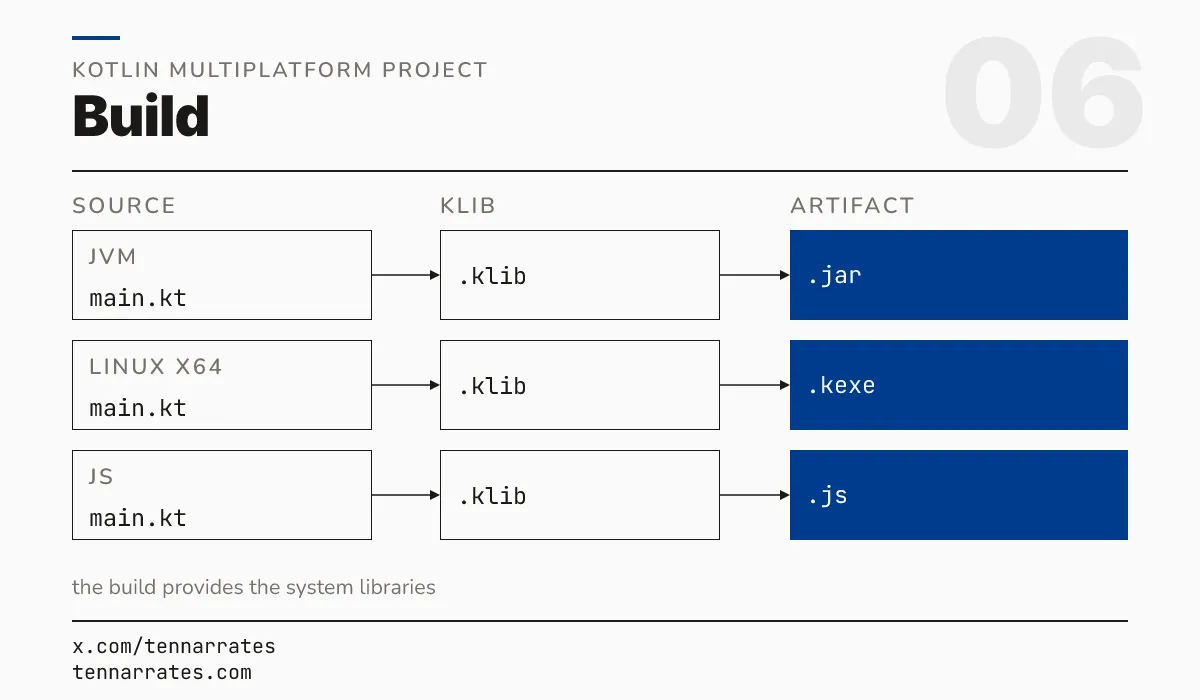
Running the build compiles each target separately. The process follows a pattern: the compiler creates a klib, and the linker creates the final binary.
  linkDebugExecutableLinuxArm64 - Links an executable 'debugExecutable' for a target 'linuxArm64'.
  linkDebugExecutableLinuxX64 - Links an executable 'debugExecutable' for a target 'linuxX64'.
  linkDebugExecutableMacosArm64 - Links an executable 'debugExecutable' for a target 'macosArm64'.
  linkDebugExecutableMingwX64 - Links an executable 'debugExecutable' for a target 'mingwX64'.
  linkDebugFrameworkMacosArm64 - Links a framework 'debugFramework' for a target 'macosArm64'.
  linkDebugSharedLinuxArm64 - Links a dynamic library 'debugShared' for a target 'linuxArm64'.
  linkDebugSharedLinuxX64 - Links a dynamic library 'debugShared' for a target 'linuxX64'.
  linkDebugSharedMingwX64 - Links a dynamic library 'debugShared' for a target 'mingwX64'.
  linkDebugStaticMacosArm64 - Links a static library 'debugStatic' for a target 'macosArm64'.
The build tool picks the system libraries for each target automatically. It knows that macOS needs libSystem and Linux needs libc.
The result is a set of artifacts: .kexe and .framework for macOS, .so for Linux, .jar for JVM, and .js or .wasm for the web.
When you add a new target to your project, you are not just adding a compiler flag. You are asking a platform to build its own story from your shared source.